
A Great Opportunity for You!
ByDesign Sponsors Fund Raising Campaign with Company Match for Hurricane Victims
TAMPA, F.L., September 27, 2017, ACCESS NEWSWIRE – ByDesign Technologies, the leading provider of software for the direct selling industry, today announced a national fundraising campaign to provide aid to the victims of hurricane Maria. After the impacts of Harvey, Irma, and Jose, the news of the devastation caused by Maria and the unprecedented humanitarian crisis in Puerto Rico ignited the urgency for ByDesign to lead this campaign.
In the wake of this widespread destruction, people watching from the rest of the world may feel helpless, but there are ways to get involved and help the victims.
ByDesign has partnered with several non-profit organizations in this campaign that were selected on the basis of influence within Puerto Rico, trust, credibility, and effectiveness: Love The Nations; Agape Flights; Tender Mercies; and, Water Step.
ByDesign will be providing matching donations for the next week to accelerate the funding momentum. For every dollar you contribute, the victims will receive $2 of support.
The funds will be used to address immediate humanitarian needs, including access to food and clean water, safe shelter, hygiene resources, and clothing. The first relief mission will be transported by Agape Flights on September 28th with ready meals to feed 60,000. We are actively seeking donations that will enable the supplies to send two flights that day and ongoing flights going forward. The supplies will include chainsaws, generators, gas containers, water filtration systems, as well as meals and other resources.
Assisting the victims of Maria is a very personal service for the ByDesign team. We have employees that are from Puerto Rico, and we are praying for all the family members whose safety has not yet been confirmed. Employees of ByDesign will also be donating vacation days that will be converted into financial donations to support this effort.
We encourage you to join us in this campaign to rebuild hope in the hearts and minds of family members, friends, and neighbors in Puerto Rico.
Four Ways to Donate:
- LOVE THE NATIONS SITE
(include “ByDesign Company match in the Note section) - GoFundMe
- Amazon.com product donation page for LOVE THE NATIONS
- Ask your employer to allow you to donate one or more of your vacation days
(Contact Linda Gulla at ByDesign, 813-253-2235 x125 with any questions on this donation process)
About Love the Nations:
Love The Nations is a private, non-profit 501(c)3 corporation based in Tampa, Florida.
This organization is providing feet on the street in Puerto Rico and partnering with local churches to distribute supplies and resources to the local communities.
About Agape Flights:
About Agape Flights is a 501(c)(3) nonprofit, Christian aviation ministry. Their mission is to provide excellent aviation service delivering cargo, mail and humanitarian aid to missionary partners serving Christ, carrying hope to the nations of the Caribbean.
About Tender Mercies:
Tender Mercies is a ministry of Princeton churches and the community. The volunteers and supporters of various faiths work together to provide nourishing food at no cost to those in need from the Princeton area in a compassionate and caring atmosphere.
Water Step International:
Water Step International is a not-for-profit support organization that provides safe water to communities in developing countries through empowerment, equal access, and transformative hope.
Corporate and Media Contact:
Linda Gulla
VP of Marketing
ByDesign Technologies
813-253-2235 x125
linda.gulla@bydesign.com

Inventory Update
Have you ever needed to create a whole new fall inventory catalog, but the idea of manually making 50 items felt too daunting? Well, luckily for you, there is a tool made for just this reason. The Inventory Import tool uses CSV files to import inventory items in bulk to avoid hours of one-by-one configurations.
Currently, the Inventory Import tool supports importing the following data (followed by Row Header):
- Creating the base item (ItemDetail)
- Creating the Price Rows (ItemPrice)
- Associating an image with the item (ItemImage)
- Adding Category (Category)
- Adding Warehouse details, including stock counts (ItemWarehouse)
- Creating Inventory Groups (ItemGroup)
- Associating a country (ItemCountry)
- Adding miscellaneous flag and attribute associations (ItemMisc and ItemAttribute, respectively)
- And last but not least, copying pricing from one item to another via ItemPriceCopy
Each of these features is done by creating a CSV file with the relevant information on it. To access the Inventory Import tool, you will first want to log into Freedom, choose Departments from the top right, select Inventory. Once in the Inventory Department, you will select Administration from the local menu and select “Inventory Import.”
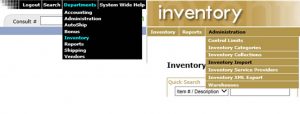
The Inventory Import interface includes sample files to download. These are a great way to get a head start and to understand the layout. Also in the zip file with samples is a definition file which gives all of the details on what is supported and what isn’t, as well as what each field may mean on the import files.
In using the sample files, you can ‘fill out’ the form and then use that CSV to upload to create the items. There are many details, so please refer to the definition file for complete details!

A few things to be aware of when using the Inventory Import tool:
- The file format to upload must be in CSV format. This means that Item Descriptions and Explanations should not include commas; otherwise, you could run into formatting issues. They can be added later by editing the item in back office if needed.
- You can include multiple types of rows (ItemDetail, ItemPrice, etc.) in a single file; however, the ItemDetail needs to be processed so that the item exists. You cannot put the cart before the horse!
- Headers on the files should NOT be included.
- You can use the tool to update existing inventory! To enable this feature, please review the Freedom Setting by going to Departments > Administration > Settings > Freedom Settings > and search for the term “inventoryimport”. If you choose to do this, please test on a sample and single item beforehand to make sure your results are as anticipated. Mistakes will be time-consuming to revert.
- It is HIGHLY recommended that once completed; you review ALL created inventory to ensure everything is configured as intended. It may not be a bad idea to have an additional person review, as well.
- This activity would be perfect if you have a paid Sandbox Site. Inquire within if interested.
The Inventory Import tool is very powerful, so should you have any questions, concerns or thoughts – our Support Team is standing by waiting to assist. Call Client Support at 813-253-2235 or email support@bydesign.com for more information.
Solve Problems Faster
In support, we do our best to work through any problems you might have with the software as efficiently as possible. However, there can be some issues that are harder to track down than others. While we keep meticulous logs of web traffic and any errors generated by the system, there are times that a little more of just the right information can go a long way. Here are some things that you can do to help us to assist you better.
- Always include a link to the page in question.
- Include the specific steps for how you arrived at the page or how you were able to replicate the issue.
- Tell us who had the issue. The Rep Number, Customer Number or Back Office username.
- Include screenshots of the issue.
- Specify the exact date and time with your local time zone.
- Include a video if there are too many steps to relay easily.
- Can you replicate the problem 100% of the time?
Providing this information will help us to identify and resolve the problem quickly. The best way to reach support is by a phone call to 813-253-2235, Option 1. You may also email us with the information to support@bydesign.com. If you have artifacts to share (as described above), try emailing first, then calling!
We are excited to announce that next week is Release Week! You’re receiving over 80 feature improvements and new features, and we are excited to highlight a few! If you have any questions about your new features, please contact Client Support.
- Updated the “Closed Parties” report in the Back Office to contain the report criteria and results columns from all Closed Parties Reports. Relocated menu path: Departments > Reports > Party > Closed Parties.
- Enhanced the Price Range Filter on Cart 2.0 listing page to allow for removal or customizable price ranges.
- Enhanced the functionality for bonus types that are not Clawback aware to allow negative payouts as a configurable option.
- Implemented the Genealogy Upline Report pages in the Reps area in Freedom BackOffice in the new Service-oriented architecture.
- Created a new Representative Dashboard that allows Back Office Users to view pertinent representative information in a dashboard/grid style format.
- Created new widgets for the Representative Dashboard.
- Enhanced the volume rollup process to be executed during the inline cancellation process. This avoids manual rebuild of the volumes and increases the accuracy of volumes displayed.
- Optimized the Multiple Products and Single Products reports by condensing the secondary filtered reports into single reports.