
President’s Message
This release will go live the week of April 16th.
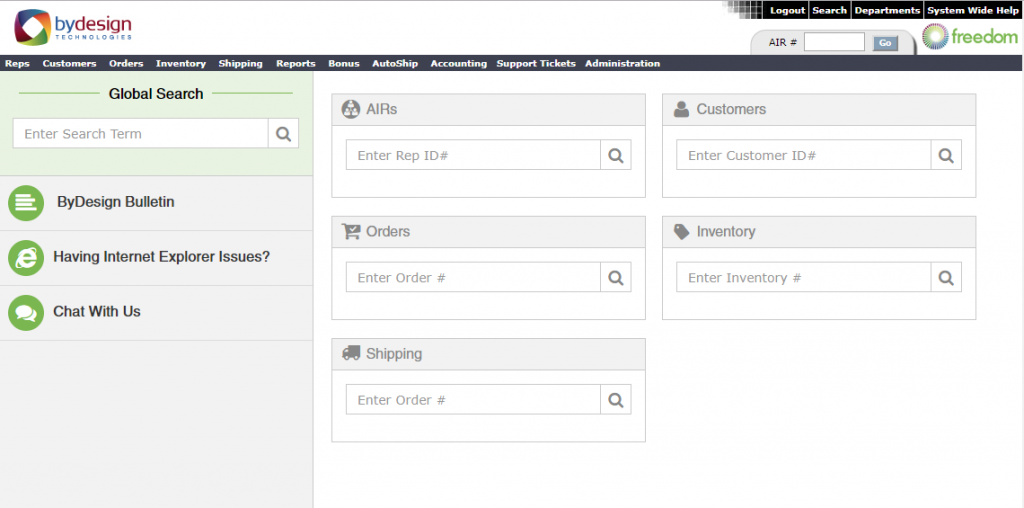
- Redesigned the Freedom Landing Page
- Enhanced Shopping Cart 2.0 for improved consistency of font use and colors between cart and Revolution by adding tertiary color and general CSS styles.
- Enhanced Cart 2.0 Representative Login to allow users to use their URL value as their login.
- Improved consistency of WebAPI Customer Creation IP logging.
- Optimized Currency Update\Display logic before items are loaded to the shopping cart.
- Enhanced Currency Display on several shopping cart pages, also adjusted edit address required fields.
- Corrected the checkout address edit to return the previously associated city, state, city, and country tied to the postal code
- The Shopping Cart experience has been improved by requiring a new Customer login attempt after the account has been cancelled or transferred. Allows a smoother process for the Customer to complete an order properly and under the correct Representative.
- Increased the input box size for Gift Certificates on the Checkout Page.
- Optimized Inventory Category Controllers to Synchronize with each other, also activate country in use.
- Added multi-currency support to the Dead AutoShip Profiles report.
- The performance of the Dynamic Bonus Engine was improved by creating a new auto-archive process for bonus data. This increases the response on the retrieval of the historical records that are used in bonus related areas.
- Optimized News Article Image Upload process.
- Created a new Inventory Collection API. This provides the ability to return all inventory items in a specific collection.
- Improved category display for the BackOffice inventory search tool.
- Enhanced the Duplicate Inventory Item feature to have a new option to duplicate Return Price for Group Item(s).
- Enhanced the Orders vs. Payments, Sales, Sales Summary, and Sales by Months reports to ensure that the values match throughout the reports
- Optimized RestFul PUT Online Order API to update City field case insensitive
- Enhanced the system so that when orders are modified the gift certificate expiration is not modified.
- Created REST API for GetOrderDetailsInfo.
- Adjusted Order Totals being displayed inaccurately in Revolution.
- Optimized Customer Order – Email to Customer Autoresponder to trigger when Customer Party Orders are posted.
- Updated the Apply Discounts page to properly round the totals for uneven totals to make sure half cents are not rounded on future tax and order total calculations
- Optimized Shopping Cart Checkout to properly reflect quantity
- Enhanced shipping discount promotion display in Party to display additional shipping discount types.
- The Revolution Compensation Reports were updated to include the relative position/level from any downline Representative as a new column in the results.
- Improved Extranet Qualification Report Translations for columns on report.
- Enhanced Revolution Responsive Advanced Genealogy report to allow for configuration of including/excluding cancelled representatives by default.
- Enhanced the upgrade process to give the user more information about their subscription terms to ensure that we are in compliance with our gateway providers.
- The Revolution Dashboard and related reports were updated with optimized code. As a result, the Revolution performance was improved and increased.
- Enhanced Revolution “All Messages” Icon to be displayed only when Global Contact Group is in use.
- Updated the Revolution Responsive Message page to properly handle messages sent with 5000+ recipients
- Corrected an issue where some presentation thumbnails might not be displayed when accessing the Showcase microsite for an existing presentation from the public share link.
- Optimized shipping address display of the Single Product by date report
- Enhanced Trouble Ticket Page to handle potential errors.
 Meet Tony Welch
Implementation Specialist
Tony is a seasoned professional with deep experience in the area of customer experience from strategy through to implementation. He brings more than 10 years’ experience covering both technology and business processes. Accomplished and highly respected subject matter specialist in planning, developing and implementing customer launches.
Since his start at ByDesign, Tony has launched startups and large existing companies like it was second nature. His approach to each client’s needs is always geared to finding the best solution with the least amount of effort and cost to our clients. Because he has been involved in many of the client launches and customizations, he has been able to deliver combinations of configurations to solve some of the more challenging requests that have come his way with relative ease.
Tony has always been fascinated with how things work and will tell you to give him a user manual over a novel any day. Prior to joining the ByDesign Family, Tony worked for a large mobile phone manufacturer launching new products and providing call center training and documentation. He still gets excited to see the technology advancements that take place with the current juggernauts in that market.
 When not at work, Tony enjoys spending time with his wife, three girls, two dogs and a Quaker parrot. From Wii Karaoke, Saxophone & Violin duals or taking things apart to see if they can make them better, it is always a family event. His most recent hobby is 3D printing and he has now added another printer to his lineup.
Pushing Notifications to a Phone
Hello everyone! My name is Chris Brower, and I’m the Lead Architect at ByDesign. I’ve been leading up development of our new phone app for the past year, and I’d like to share some of our decisions and development we’ve work to deliver a great app experience. One of the most exciting changes in the new app is that each client will have their own branded version of the app. Also, the new app will be branded the same as Revolution and use the same configuration as Revolution, meaning all menus and setup within Revolution will be immediately available within the phone app. The new app has many other features we’re excited about such as over-the-air updates and native tokenized authentication storage (only log in when needed just like Facebook). However, today we’re going to review another exciting feature available in the new app: push notifications.
What is a push notification? A push notification is a notification (alert) on a phone that was pushed to the phone versus being pulled. The difference between a pushed notification and a pulled notification is that pulled notifications are something that’s happening where the app “wakes up” every so often, makes a request to a server to see if there are any recent updates, and then goes back to sleep. This is very costly to a phone’s battery. Push notifications are something where Google or Apple “pushes” a notification directly to a device, just like when a carrier tells the phone it’s getting a call. This means that nothing is running in the background (except for the native phone operating system), yet the push notifications will still be received. Push notifications are preferred as they have almost zero impact on battery life versus pulled notifications.
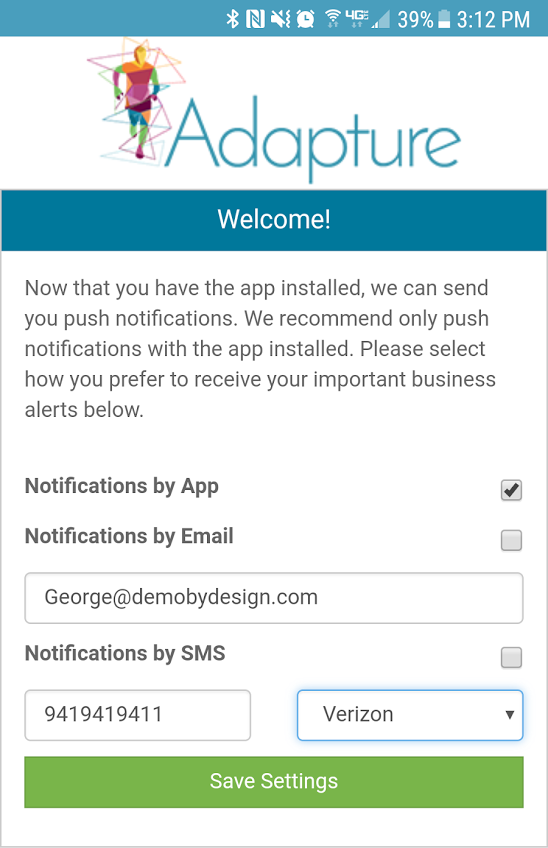
Now, in order to get push notifications to a phone, there is a handshake that needs to happen between the phone, our servers, and Apple/Google’s delivery systems. When first logging into the app, a screen like the following is shown:
This screen lets a user choose how to receive notifications. By default, we’ll enable push notifications (Notifications by App) versus text or email, but the user is welcome to disable/enable whatever they’d like. Once settings are saved, the underlying work begins. First, we’ll make sure we have permission to send push notifications to the device. Depending on iOS or Android, a pop-up will request permission to send push notifications. Once we have permission, the device will send a request to Apple/Google to get a registration token. This registration token is both a license to send push notifications to the device as well as something that identifies the device. We’ll then send a request to our servers to store this registration token. Every time the app is opened, this handshake has to happen to make sure that the registration token is valid as well as making sure we still have permission to send push notifications.
Now that our servers have the registration token, we can send push notifications. So, should an alert be configured to notify when somebody new signs up, the alert would be sent directly to any configured phone allowing a user to immediately click on the notification and find out what is needed in relation to the new sign up. For instance, contact information could be found, and a congratulatory text or email could be sent moments after a signup!
We hope this information helps you understand the inner working that needs to happen in the background to get a notification to a device in the most efficient way possible. We’re excited about how alerts and push notifications together could greatly simplify quick and simple communication among our users, and we hope that you are excited about it as well.